graph LR;
    s1["Administration & Faculties"] --> s2["Mobiles Arbeiten - Antrag"] --> s3["Neuer Antrag"] -.-> s4["Approval by Peter"] --> done["✅"];
🏖️ Absences
Time tracking
Every team member with a contract has to track their working hours. This is mandated by German federal law. This includes student assistants (HiWis).
- Please use the timesheet template provided
- Carry over any overtime (positive) or undertime (negative) hours in the
Summefield into theOvertimefield in the next month - Carry over the number of remaining vacation days (
Urlaub: Rest) into the next month (Urlaub: Total) - The timesheets should be sent as a pdf for signature by Peter during the first week of every month
Overtime compensation
You can compensate for your overtime (i.e. extra hours worked) in the following ways:
- working fewer hours during regular workdays; this can be done without prior approval
- taking a whole working day off; this must be previously agreed with Peter
In general, overtime compensation cannot be used if you have other work commitments at that time (i.e. meetings or other scheduled duties).
Note
Overtime hours cannot be paid out.
Vacation / Annual Leave
Every team member with a contract has a right to 30 days annual leave (pro rata) every year, plus the Berlin state holidays. Your annual leave is tracked using a vacation form, which has to be signed by Peter.
Note
If you have not booked any annual leave this year, download a new vacation form and fill in the header digitally.
- Discuss your vacation plans with Peter.
- In general, your vacation will be approved without issue.
- If there is an upcoming deadline, planned project meeting, or some other agreed appointment during your vacation time, we can try and work around the issue.
- Send an email to Peter with your vacation request.
- Include dates in your vacation request!
- Attach the above vacation form with your (digital) signature.
- Peter will reply to that email approving the vacation and signing the vacation form.
- Your vacation is now approved!
- Mark your vacation in your Outlook Calendar.
- Mark the time off as
Out of Office. - You should also mark the vacation in the FGKW Work Calendar.
- Mark the time off as
- Mark your vacation days in your timesheets.
- For full-time employees, each of your annual leave days covers a whole work day of 7.88 hours (i.e. 39.4 hours/week over 5 work days)
- For HiWis, each of your vacation days covers an average work day of 1.84 hours (i.e. 40 hours/month for 12 months over 261 work days in 2026)
Warning
Please announce your vacation plans in advance. Only book your vacation trip after Peter has approved your vacation. For insurance reasons, you must
Note
Vacation from previous year has to be used by September of the current year. Please use your vacation to prevent burn-out. Try to take most of your vacation days in the same calendar year.
Sick leave
Important
Do not come to work sick. This is of course good for your own health, but it is especially important out of courtesy to your colleagues!
Tip
University regulations apply. For more detail, see the latest circular from 14.02.2025.
- If you’re not feeling well (and cannot do home-office), send an email to Peter and Julia.
- Sickness has to be reported to Julia and Peter on the day you get ill, by 10:00.
- If you think you’ll be back at work in a day or two, please say so in the email.
- If you think you’ll be off for longer, please say so in the email!
- You do not have to discuss the details of your absence with either of us. If you’re sick, you’re sick.
- You have to provide a doctor’s note for medical absences longer than 3 calendar days.
- You should see a doctor on your first day of absence.
- Ask the doctor how your absence will be reported (digitally or by paper).
- If digitally: The doctor will inform the insurance. TU Berlin will retrieve this from the insurance. Let Peter and Julia know this is the case!
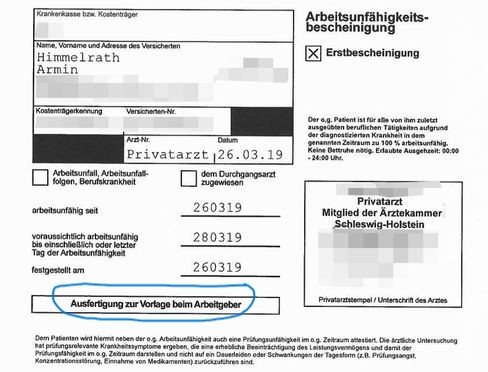
- If by paper: Scan the “Arbeitsunfähigkeitsbescheinigung” and send it by email to Peter and Julia. Make sure you send the copy for the employer, i.e. “Ausfertigung zum Vorlage beim Arbeitgeber”, see Figure 1.
- The doctor may give you a copy of an “Arbeitsunfähigkeitsbescheinigung” for your records; keep this for yourself. Don’t send this copy to Julia or Peter, as it has private information.
- If possible, mark your sick leave in your Outlook Calendar.
- Mark the time off as
Out of Office. - You should also mark your sick leave in the FGKW Work Calendar.
- Mark the time off as
- You have to let Peter and Julia know once you’re back at work.
- Send us an email on the first day you’re working after sickness (even if home-office).
- Peter or Julia will inform HR that you are back in office.
- Do not forget to mark your absence in your timesheet.
Improperly reported sick leave affects your pay!
If you are absent for 3 or more days, and do not have a doctor’s note, your insurance won’t pay you. If you do not report the exact start and end of your absence, TU Berlin won’t know which days to pay you. Repeated failure to report sick leave may result in disciplinary action.
Take care of yourself.
Mental health is as important as physical health. The above section also applies in principle to absences due to poor mental health (including burn-out, depression, anxiety, etc.).
You can always approach Peter, but if you are not comfortable with that:
- The university offers confidential counselling with a waiting time of about 2-3 weeks.
- In acute cases, the Berliner Krisendienst offers a crisis service, and the university website has further resources.
Don’t be afraid to take some time off and seek support.
Winter closure
The university will be closed be from the morning of the Friday the 18th of December 2026 until and including the Monday the 4th of January 2027. During this time there will be:
- No access to the building.
- No access to the labs.
- No hot water in the building.
Note
Last working day with access to the lab is the Wednesday, the 16th of December 2026.
Note
The 6-monthly inspection of the lab is planned for the Monday, the 14th of December 2026.
Warning
Make sure the labs are left in a safe, tidy state before the winter closure.
In the days of Winter closure that are not public holidays, you can work remotely 100%, use your vacation days, or claim overtime compensation.
Home office
You are allowed up to 40% of remote work (i.e. 2 days a week), up to the discretion of your direct superior (Peter). However, you need to register for home office using the SAP system:
Once registered, you are allowed to do Home Office without notifying Peter.
Your tasks - your responsibility!
Plan your work. Home office is useful for literature research and data work-up. If your tasks are mostly experimental, you might not be able to spend 40% of the time in home office!